API Security Audit
The starting point for the API security is the API definition itself. If the API definition has gaping security holes, applying security measures on top of that just creates a ticking time bomb. The first step is to properly specify in your API definition the security constraints that an API consumer must conform to so that it can consume the API. This is where auditing the security of your API steps in.
Whenever you import an API definition into the 42Crunch Platform, API Security Audit automatically performs a static analysis on the API definition. Your API is audited against the standard that it proclaims to follow (the OpenAPI Specification (OAS) or GraphQL) to check that the definition adheres to the standards, protocols, and best practices, and to catch any security issues your API might contain.
Security Audit performs over 200 checks on your API contract, ranging from its structure and semantics to its security and input and output data definition. The results clearly indicate the issues found and their respective severity levels, both when listing the APIs in a collection and in the audit report, so you can prioritize in which order to start fixing things.
Inadequate data validation is the most common attack vector in API security. It is very important to properly restrict what gets passed to your API and backend server and what your API can pass back to API consumers. This is reflected in Security Audit: in terms of numbers, checks on data definition quality form the biggest part of the audit. Data validation also contributes more to the audit score.
What you can audit
- The file size of your API should not exceed 10 MB.
- The OpenAPI Specification (OAS) v2, v3.0, and v3.1 are supported. The API definition must be in JSON or YAML format (
.json,.yaml, or.yml).If you import OpenAPI definitions in YAML format to the platform, they are automatically converted and stored in JSON format. However, you can continue to view, edit, and download them in YAML format.
- GraphQL schema definition files (
.graphql,.graphqls,.gql,.gqls,.sdl) are supported. GraphQL introspection files are not supported. - GraphQL data definition files and supergraphs for GraphQL federation are supported.
Support for GraphQL is not enabled by default in your organization on the platform, but is available as a separate subscription.
In principle, the audit works the same for both OpenAPI and GraphQL APIs, but because the standards are different, there are some differences, for example, what checks are run and how some types of issues are reported.
Security Audit on OpenAPI definitions
Security Audit reviews your OpenAPI definition on three levels:
- Format validation: Is your API valid and well-formed as per the standard it claims to follow, and does it follow the best practices and the spirit of it? Can it be correctly parsed, reviewed, or protected?
- Data definition quality: What is the data definition quality of your API? How well have you defined what data your API accepts as input or can include in the output it produces, and how strong are the schemas you have defined for your API and its parameters?
- Security: How good are the security definitions in your OpenAPI definition? Have you defined authentication and authorization methods, and is your chosen protocol secure enough?
Data validation and security definitions are checked both on the global path level (affecting the whole API) as well as on operation level in individual operations.
For any given schema in your OpenAPI definition, Security Audit follows and checks the first six consecutive JSON references to other schemas before it calculates the final score for the schema it is currently evaluating. Any further references in that schema are ignored. This does not mean that Security Audit would not evaluate all schemas in your OpenAPI definition: the audit will in turn check each and every schema you have defined in the API, so you do not have to worry that any potential issues would not be discovered. The limit to chained schema references is merely to avoid excessive loops between the schemas when calculating the audit score.
Audit report
When Security Audit finishes, you get a detailed report of the issues the audit found in your API. The report summary shows:
- What kind of issues the audit found in your API
- How many times the issues occurred
- How many points the issues take away from your audit score (and consequently add most points to your audit score if fixed)
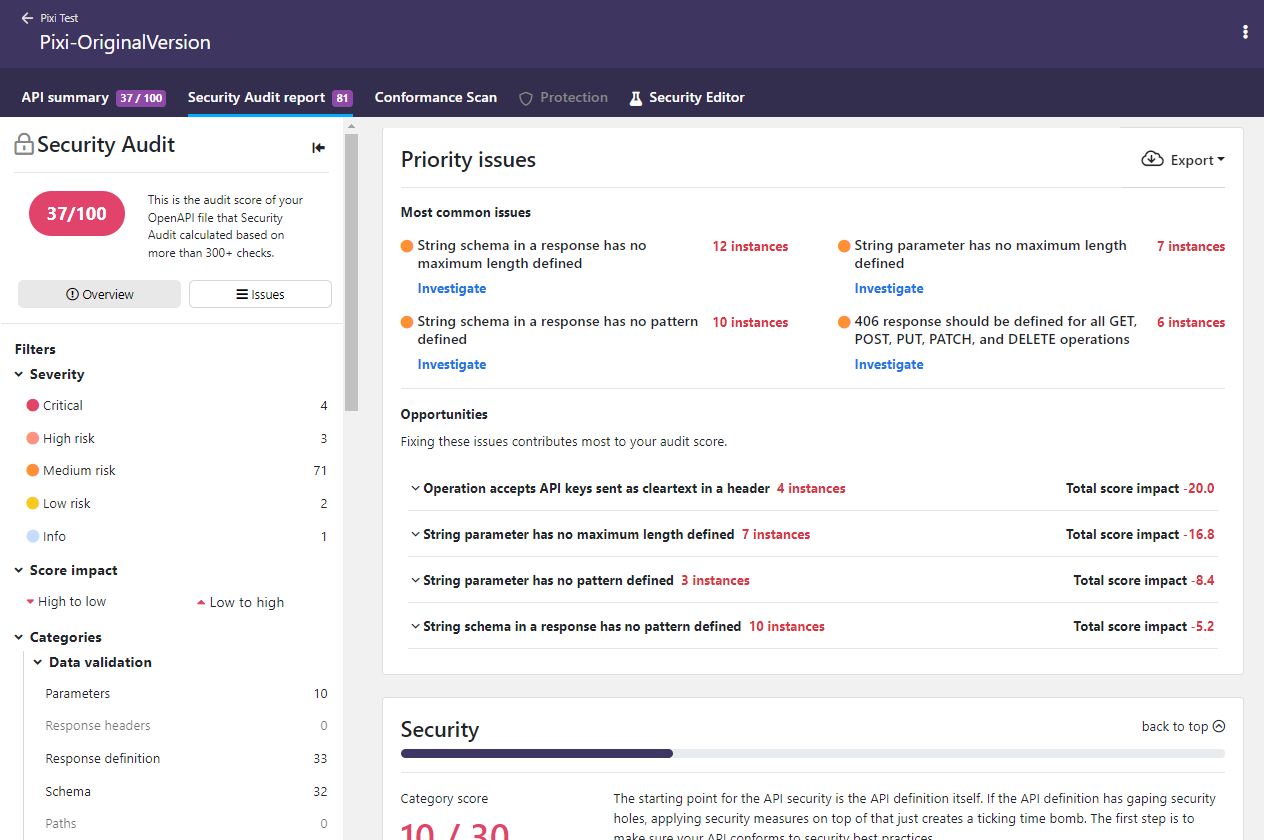
You can filter which issues are shown on the report page to home in on particular cases. If you click on an issue, you can view more details on it, such as where it occurred in your API, why it is a problem, and how to fix it. You can also jump directly to Security Editor to fix it in your API and rerun the audit to see the improvement immediately.
Each occurrence of an issue shows a unique fingerprint (identifier). This fingerprint remains the same in subsequent audits until the issue has been fixed, meaning that it can be used to track fixing of the issues.
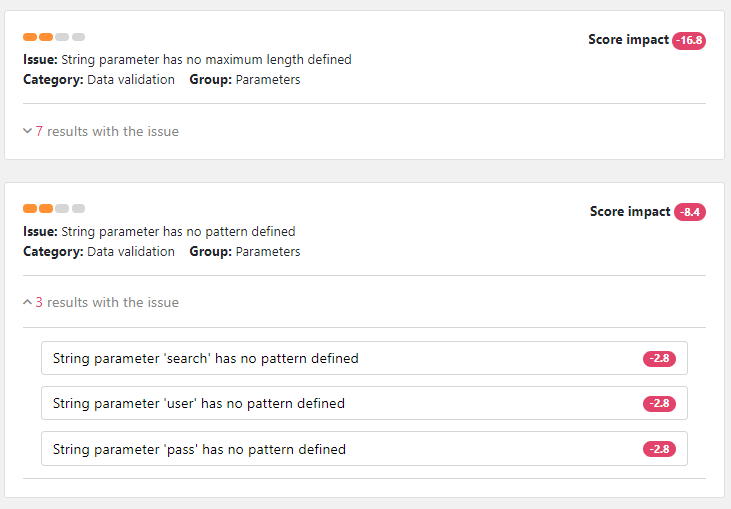
The report shows the impact of each issue is, so you can prioritize what to fix first. The list of found issues shows how many points each issue deducted from the audit score of the API. If the issue occurred multiple times, the total impact from all occurrences is shown. Fixing the issues with the biggest impact on the score is the fastest way to a better audit score.
If your API has structural or semantic issues, it is not a valid API definition. The API validation fails and you do not get a full audit report until you have fixed these issues. In addition, you cannot proceed to scan or protect your API as long as its structure or semantics does not conform to the standard it claims to follow, because this prevents reliable operation of API Firewall.
The audit report also provides separate tabs where you can check why your API definition did not pass security quality gates (SQGs) of your organization, or if checking for some issues was skipped because of audit rules.
You can download a copy of the report, for example, to share the results outside the platform.
Issue occurrences in the audit report
By default, if an issue keeps recurring in multiple places in your API, Security Audit shows only the first 30 occurrences of the issue ID in detail in the audit report. This avoids cluttering up the audit report and keeps it readable and actionable. The details of the rest of the occurrences of the same issue are included in the report on subsequent audits as you fix the ones already reported. Security Audit always count all occurrences in the total number of found issues.
However, sometimes there might be a need to get the full, unlimited audit report, for example, to get metrics on the full breakdown of all audit issue occurrences. For this purpose, you can re-run Security Audit without the normal 30-issue limit. This means that Security Audit runs the audit as per usual, but does not leave out any occurrences of issues, no matter how many. The total number of issues does not change, only the amount of — somewhat duplicated — issue details in the report increases.
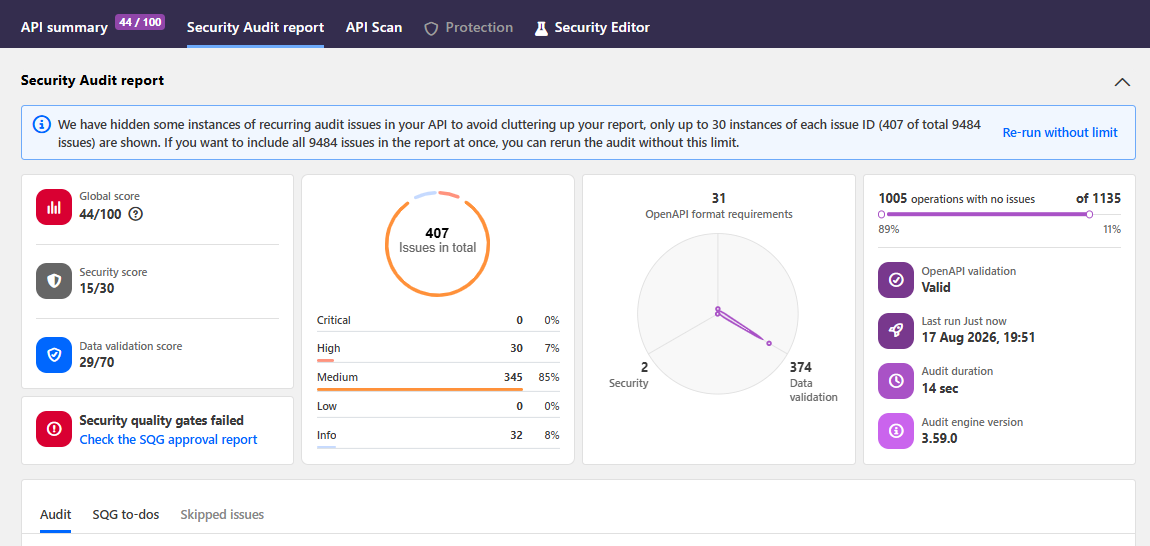
Depending of your API, this can mean anything from just a few to hundreds to thousands or even tens of thousands more issue details in the report. This means that generating the audit report and loading it for viewing can take longer than normal. Because of this, the unlimited audit reports are always opened first in a less detailed view, and you can choose either to download the report for viewing locally or to view the report in your browser.
Overriding the default 30-issue limit is only used for a single audit run, and by default the next audit is run with the limit. You cannot override the limit when importing or uploading API definitions to 42Crunch Platform, or when saving changes in the Security Editor. Because only the latest audit report is stored, this means that the unlimited audit report may be overwritten by a new, normal audit report without a warning. Therefore, it is best to consume the unlimited report in your downstream services or store it outside 42Crunch Platform as soon as it is produced.
Audit score
Security Audit calculates an audit score for each API it analyzes, based on the annotations in the API definition.
Each API definition gets an initial pool of 100 points, split between the two categories of security risks as follows:
- Security analysis: max. 30 points
- Data validation: max. 70 points
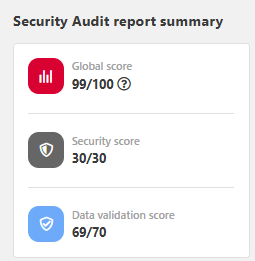
During the audit, each security risk that Security Audit finds in the API definition takes away points according to the impact of the found issue, reducing the audit score of the API. In other words, the more points an API definition has, the better and more secure it is.
Security Audit uses a special algorithm to calculate the impact that different security risks from security schemes or requirements or poor data validation have on the audit score. Each risk has a base number of how many points they take away from the audit score. This starting point indicates how bad the issue itself is.
For your convenience, the audit score is shown as a rounded value, but if you hover on the score, you can view the exact value.
But Security Audit also considers the sensitivity level of the whole API or API operation. This reflects the level of risk involved with the API operation or the data it handles, and sets a severity multiplier for how risks are weighed in the algorithm: the higher the sensitivity, the more severe the issue and the more weight it gets. By default, sensitivity is considered to be medium, but you can tweak this directly in your OpenAPI definition if needed (see Customizations for Security Audit).
The audit score of your API definition affects API Protection. API Protection creates an allowlist of the valid operations and input data based on the API contract, and API Firewall enforces this configuration to all transactions, incoming requests as well as outgoing responses. If the audit score is too low, the security in your API definition is not yet good enough for a reliable allowlist. Security Audit should give your API 70 points or more before you can reliably protect it.
To improve the quality and security of your API, and to increase your audit score, you must fix reported issues and re-run Security Audit. For more details on fixing the issues, see Security Editor and extensions for third-party editors.
You can also integrate Security Audit with your CI/CD pipeline so that any changes to APIs in your project are automatically audited for security. For more details, see CI/CD integration.
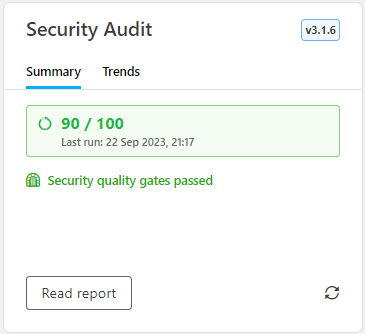
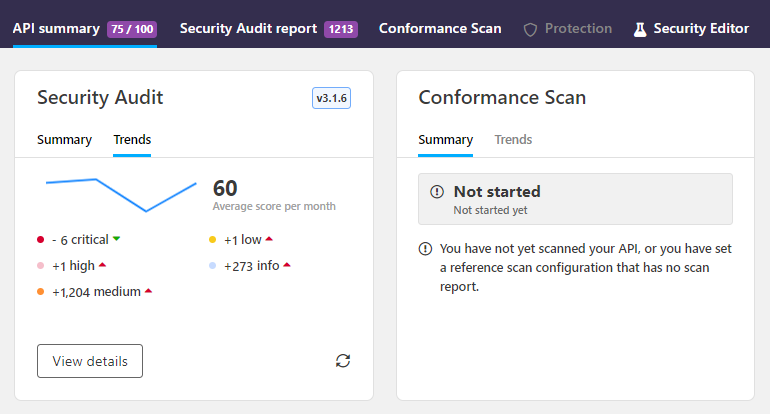
You can see how the audit score of the API has evolved over time in the Security Audit trends chart on the API summary page:
Multiple security risks in a single security requirement
APIs often define several different security schemes to accommodate for different authentication methods. These can then be combined in different ways in the security requirements that apply the security measures, either to the whole API or to a particular API operation. This in turn means that Security Audit can raise multiple issues in a single security requirement in your API definition.
If you have a single authentication method in a security requirement and Security Audit raises an issue on it, the impact to the audit score is clear and direct. However, if you have defined multiple authentication methods in the security requirement, bit more calculation is needed. In this case, the relative security of different authentication methods changes how the issues impact of the audit score.
In security, the most severe risk is the biggest concern. If the audit finds multiple security risks of varying severity in a single security requirement, it is the least secure authentication methods that pose the biggest risk to your API. Thus, only the methods deemed as the biggest risks affect the security grade and audit score.
The more secure authentication methods provide more protection even if they are not perfect. Issues found in them are raised as per usual, but they do not affect the audit score until the more severe issues found in the same security requirement are fixed. On subsequent audits, the impact of the less severe risks rolls in as the higher level risks get fixed.
When Security Audit finds security risks in a security requirement that applies multiple security schemes, it first checks the sensitivity of the API or the API operation, depending on which level the security requirement has been defined. Based on that, it then checks the severity of each issue found, and rates the different authentication methods (like OAuth 2.0, the various kinds of HTTP authentication, API keys) based on how secure they are on a scale of 1—5, from not severe and most secure to critical and least secure. Once Security Audit knows which issues are the most immediate concern, it can the calculate the impact on the audit score.
 Example
Imagine your API definition only allows HTTPS connections and has two operations that both have multiple security requirements defined. You are using a secure OAuth 2.0 flow in your OAuth2 scheme. The operation /Cat is sensitive, while the operation /Dog is not sensitive at all. You have used the x-42c-sensitivity extension to tell Security Audit that these operations should not be considered equal:
{
    "servers": [
            {
                "url": "https://my.api.server.com/",
                "description": "API server"
            }
        ],
        // ...
    "paths": {
        "/Cat": {
            "x-42c-sensitivity" : 4,
            // ...
            "security" : [
                { "BasicAuth": [] },
                { "Oauth2": ["readOnly"], "BasicAuth" },
                { "apiKey1": [],"apiKey2": []  }
            ],
            // ...
        }
        "/Dog": {
            "x-42c-sensitivity" : 1,
            // ...
                "security" : [
                    { "BasicAuth": [] },
                    { "Oauth2": ["readOnly"], "BasicAuth" },
                    { "apiKey1": [],"apiKey2": []  }
                ]
                // ...
        }
    }
}
Security Audit checks the security requirements, what issues should be raised for them, and what is their severity. Only HTTPS is allowed, so no issues on cleartext are raised. The operation /Dog is marked as not sensitive, so Security Audit raises no issues on it. For the operation /Cat, Security Audit notes the added sensitivity from x-42c-sensitivity and gives the following rating:
BasicAuth: issue severity is3OAuth2: issue severity is1apiKey1andapiKey2: issue severity is3
{
    "/Cat": {
        "x-42c-sensitivity" : 4,
        // ...
        "security" : [
            { "BasicAuth": [] }, -->3
            { "Oauth2": ["readOnly"], "BasicAuth" }, --> 1,3
            { "apiKey1": [],"apiKey2": []  } --> 3, 3
        ],
        // ...
    }
    "/Dog": {
        "x-42c-sensitivity" : 1,
        // ...
            "security" : [
                { "BasicAuth": [] }, --> 1
                { "Oauth2": ["readOnly"], "BasicAuth" }, --> 1,1
                { "apiKey1": [],"apiKey2": []  } --> 1,1
            ]
            // ...
    }
}
Security Audit ignores BasicAuth that is applied together with OAuth2, because the more secure OAuth2 provides protection for it:
{
    "/Cat": {
        "x-42c-sensitivity" : 4,
        // ...
        "security" : [
            { "BasicAuth": [] }, --> 3
            { "Oauth2": ["readOnly"], "BasicAuth" }, --> 1, 3
            { "apiKey1": [],"apiKey2": []  } --> 3, 3
        ]
    }
}
OAuth 2.0 over HTTPS uses a good flow and is secure, so Security Audit does not raise any issues for it:
{
    "/Cat": {
        "x-42c-sensitivity" : 4,
        // ...
        "security" : [
            { "BasicAuth": [] }, --> 3
            { "Oauth2": ["readOnly"], "BasicAuth" }, --> 1
            { "apiKey1": [],"apiKey2": []  } --> 3, 3
        ]
    }
}
This means that only the three security requirements in the operation /Cat rated at severity 3 will affect the audit score. Now, Security Audit is ready to calculate the score impact.
The maximum points for security is 30 points. Security risks in more sensitive operations pose a bigger threat, so they get a bigger share of the total pot, but the maximum grade is divided between all operations in the API. So even though the operation /Dog did not raise any issues and does not affect the audit score at all, it does have a role to play in the calculations.
In this example, the potential points are allocated to the two operations as follows:
/Catcounts 24 points towards the maximum of 30/Dogcounts 6 points
Now that Security Audit knows how many points the operation /Cat could have gotten, it can count how many points the found issues take away from the audit score. In the end, the three issues found reduce the score for security and the audit score of your API by 18 points to 12/30.
You decide to remove the lone BasicAuth because you realize that you do not actually need it:
{
    "/Cat": {
        "x-42c-sensitivity" : 4,
        // ...
        "security" : [
            { "BasicAuth": [] }, --> 3
            { "Oauth2": ["readOnly"], "BasicAuth" }, --> 1
            { "apiKey1": [],"apiKey2": []  } --> 3, 3
        ]
    }
}
However, this is not yet enough to increase your audit score, because you still have the issues from apiKey1 and apiKey2 left. The found severity 3 issues still take away 18 points as before, but they are now reallocated between the two remaining issues. Only after you have fixed the issues with apiKey1 and apiKey2 does the severity of the found issues raise to 1 from the OAuth2 and your audit score increases:
{
    "/Cat": {
        "x-42c-sensitivity" : 4,
        // ...
        "security" : [
            { "BasicAuth": [] }, --> 3
            { "Oauth2": ["readOnly"], "BasicAuth" }, --> 1
            { "apiKey1": [],"apiKey2": []  } --> 3, 3
        ]
    }
}
Security Audit on GraphQL API definitions
Security Audit reviews your GraphQL API definition on two levels:
- Format validation: Is your API a valid and well-formed GraphQL file as per the GraphQL specification, and does it follow the best practices and the spirit of it? Can it be correctly parsed or reviewed?
- Data definition quality: What is the data definition quality of your API? How well have you defined what data your API accepts as input or can include in the output it produces, and how strong are the schemas you have defined for your API and its parameters?
- Cost analysis definition: Do the input and output of your API definition define the required details for effective cost analysis? Can you properly evaluate the cost of a particular GraphQL transaction and block the ones that would consume too much resources even before starting to process them?
Because GraphQL specification does not provide for defining security measures and authentication requirements in the API definition itself, Security Audit does not include security checks for GraphQL APIs.
GraphQL validation frameworks
The constraints that GraphQL specification provides by default may not always be adequate to business needs. For example, the five built-in scalar types — String, Int, Float, Boolean, and ID — carry no semantic or boundary constraints. This means an attacker can supply wildly out-of-range or malformed values as input, and a poorly written resolver may return uncontrolled content in output. To counter this, companies may decide to take advantage of additional validation frameworks to provide more constrained validation than pure GraphQL validation would.
Security Audit recognizes GraphQL directives from two frameworks: the 42Crunch framework, based on advising the using of custom scalars, and the GraphQL Java Extended Validation framework.
- By default, Security Audit uses the 42Crunch framework that recommends using custom scalars to enhance the quality of the data definition. The audit flags any use of a built-in scalar type that could have been replaced by a more specific custom scalar and verifies that every custom scalar carries the minimum required constraints.
- Alternatively, you can specify that your APIs are following GraphQL Java Extended Validation, in which case Security Audit will follow the guidelines of that framework. The main difference is that directives are placed on the argument or input field, not on the scalar definition and the framework does not require the use of custom scalars, because the constraints are being applied at the point of use.
Currently, APIs can only use a single framework at a time. For more details see, x-42c-graphql-validation-framework.
For GraphQL APIs, Security Audit uses cycle detection instead of a fixed depth limit, because all types in a GraphQL API must be unique. If the audit encounters a type it has already checked, it raises cycle warning and stops.
GraphQL specification provides for both built-in and custom scalar types, and both are supported in Security Audit. However, nested lists ([[String]], [[[Int]]]) require explicit @list directives on each nesting level. For
complex nested list scenarios, we recommend using custom scalars.
GraphQL file types and Security Audit
A GraphQL API is the documentation of a type system of a GraphQL service. Unlike with the OAS, GraphQL API documentation can span and include several different types of files:
- GraphQL schema definition files
- GraphQL data definition files
- GraphQL federation files (supergraphs)
All these files can use any of the file formats .graphql, .graphqls, .gql, .gqls, .sdl.
Because the files, their structure, and their focus can vary significantly, they also behave differently in Security Audit.
Auditing GraphQL schema definition files
A GraphQL schema definition file can be considered as a "normal" API definition file. In schema definition files, the focus is on what kind of operations API consumers can perform and what kind of requests and responses are involved. When you run Security Audit on a GraphQL schema file, the audit traverses the file operation by operation and all type definitions are assumed to always be part of an operation. As accepted inputs and outputs are described in requests and responses, the security risks that the schema definition poses can be reliably quantified and the audit score can be calculated as per usual. You can also edit the file in Security Editor in 42Crunch Platform.
You can audit schema definition files both in 42Crunch Platform and in your IDE.
Auditing GraphQL data definition files
GraphQL data definition files are very similar to schema definition files in that they, too, document the resources of a GraphQL services. However, their focus is on describing the data of the service and not the operations that can be performed on it. In fact, a GraphQL data definition file might not include any operation definitions at all, just type definitions for data.
The lack of operations means that data definition files behave differently in audit than schema definition files:
- Instead of traversing the file operation by operation, Security Audit traverses the file by iterating all type definitions directly. This means that unlike when auditing schema definition files, even types that are not used in any operation are checked.
- If operations are present in a data definition file, they are audited as regular object type definitions, not as API operations.
- Because data definitions do not reliably indicate if type definitions are used in input, in output, or at all, the score impact and the audit score is calculated slightly differently on data definition files than on schema definition files.
You can audit data definition files both in 42Crunch Platform and in your IDE.
Auditing GraphQL federation supergraphs
A GraphQL federation supergraph is a programmatically produced file that orchestrates the API traffic within the federation and routes it to the correct place. The supergraph collates together all subgraphs (the individual files and resources that form the GraphQL federation) by referencing each with a federation URL, the endpoint where the resource in question is served.
In 42Crunch Platform, currently only GraphQL schema definitions and data definitions are supported as subgraphs. When importing a subgraph, you must provide its federation URL, otherwise the subgraphs that form a particular federation cannot be reliably located.
When you import a supergraph to 42Crunch Platform, it gets audited like everything else. Because a supergraph is only meaningful together with its related subgraphs, auditing the supergraph fails if any of the related subgraphs are missing or if you have not specified the federation URLs.
Being programmatically produced, never edited manually, auditing the supergraph could be seen as extraneous: all subgraphs themselves have already been audited, after all. However, the supergraph is the only place that can give an overall view of the GraphQL federation as a whole, and so auditing the it provides a summary of potential problems across the entire federation. The discovered issues must be fixed in the subgraphs themselves, not in the supergraph, to remediate them at the source.
By default, a supergraph lacks many of the details that its subgraphs have, such as custom directives. When you import a supergraph to 42Crunch Platform, these missing details must be taken into account in the audit. As part of the process, Security Audit produces a version of the supergraph that has been enriched with the details from the subgraphs, a "super GraphQL definition" describing the whole GraphQL federation. This enriched definition can be useful in providing the big picture, and so if you want, in addition to the original supergraph, you can also download the enriched version that Security Audit produced, for example, to provide a representation of the federation to someone.
Auditing GraphQL supergraphs is not supported in IDEs or CI/CD plugins, only in 42Crunch Platform.
Audit report
When Security Audit finishes, you get a detailed report of the issues the audit found in your API. The report summary shows:
- What kind of issues the audit found in your API
- How many times the issues occurred
- How many points the issues take away from your audit score (and consequently add most points to your audit score if fixed)
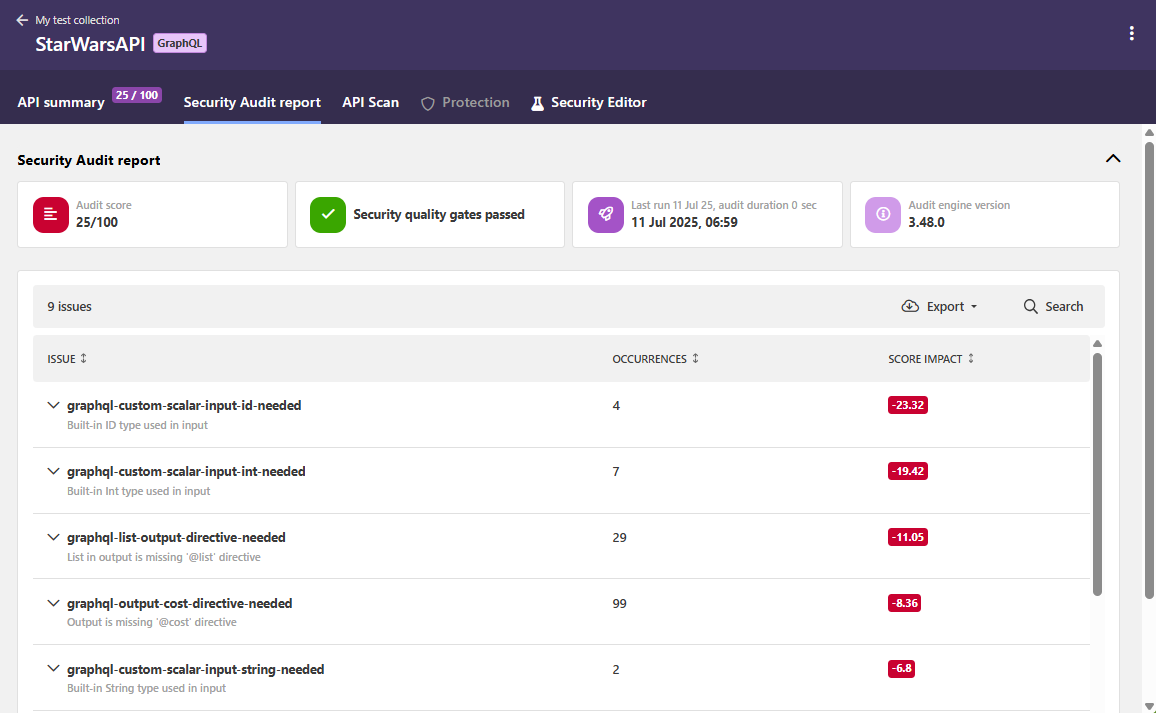
The audit report also provides separate tabs where you can check why your API definition did not pass security quality gates (SQGs) of your organization, or if checking for some issues was skipped because of audit rules.
You can filter which issues are shown on the report page to home in on particular cases. If you click on an issue, you can view more details on it, such as where it occurred in your API, why it is a problem, and how to fix it. You can also jump directly to Security Editor to fix it in your API and rerun the audit to see the improvement immediately.
The report shows the impact of each issue is, so you can prioritize what to fix first. The list of found issues shows how many points each issue deducted from the audit score of the API. If the issue occurred multiple times, the total impact from all occurrences is shown. Fixing the issues with the biggest impact on the score is the fastest way to a better audit score.
By default, if an issue keeps recurring in multiple places in your API, Security Audit shows only the first 30 occurrences of the issue ID in detail in the audit report. This avoids cluttering up the audit report and keeps it readable and actionable. The details of the rest of the occurrences of the same issue are included in the report on subsequent audits as you fix the ones already reported.
If an issue keeps recurring in multiple places in your API, only the first 30 occurrences of it are shown in detail to avoid cluttering the report up. The rest of the occurrences of the same issue are included in the report on subsequent audits as you fix the ones already reported.
Currently, structural errors uncovered in the GraphQL format of your API definition that prevent its reliable parsing are surfaced as linter validation warnings.
You can download a copy of the report, for example, to share the results outside the platform.
Structural and semantic issues in GraphQL APIs
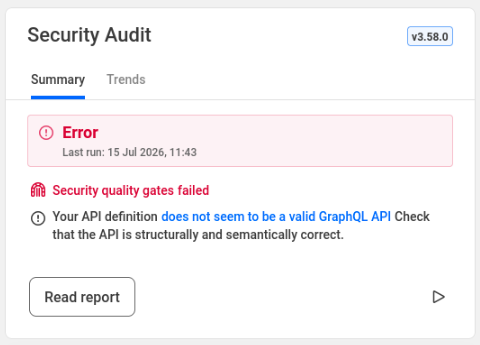
If your GraphQL API definition has structural or semantic issues that prevent its reliable parsing, it is not a valid GraphQL API definition. The API validation fails and you do not get a full audit report until you have fixed these issues. For GraphQL APIs, the structural and semantic errors are surfaced as linter validation errors, and you can view these by clicking the link on the API summary page.
Audit score
Security Audit calculates an audit score for each API it analyzes, based on the annotations in the API definition.
Each API definition gets an initial pool of 100 points. During the audit, each security risk that Security Audit finds in the API definition takes away points according to the impact of the found issue, reducing the audit score of the API. In other words, the more points an API definition has, the better and more secure it is.
Security Audit uses a special algorithm to calculate the impact that different security risks from poor data validation have on the audit score. Each risk has a base number of how many points they take away from the audit score. This starting point indicates how bad the issue itself is.
For your convenience, the audit score is shown as a rounded value, but if you hover on the score, you can view the exact value.
To improve the quality and security of your API, and to increase your audit score, you must fix reported issues and re-run Security Audit. For more details on fixing the issues, see Security Editor and extensions for third-party editors.
Customizations for Security Audit
Not all APIs and API operations are equal, so one size does not fit all. It might be an overkill to require the strictest security from an API that does not handle sensitive data. This also applies on operation-level, an operation listing ATM locations does not require same level of security as, say, payment operations. Customizations let you enrich your API definitions with additional information on how they should be handled during audit.
Customizations in OpenAPI definitions
You can use customizations in your OpenAPI definitions to, for example:
- Declare that your API uses mutual TLS (mTLS) authentication
- Allow empty security requirements (
security: []), to indicate where authentication is not needed - Switch off authentication checks
- Stop audit flagging certain issues that you know are safe to ignore by skipping them in the audit.
You cannot skip structural (
validation-) or semantic (semantic-) issues when auditing OpenAPI definitions, as these are required to make sure your API definition is valid according to the OpenAPI Specification (OAS). - Define the sensitivity of an operation
Because the customizations for audit use x-42c vendor extensions to the OpenAPI Specification (OAS), they can in most cases be done in two ways:
- Define customizations as audit rules in 42Crunch Platform. The extensions are wrapped into a
directivesobject that is then applied to your API definitions in 42Crunch Platform on the global level when they are tagged with the associatedcategory:tagpair. When the audit rule takes effect, subsequent audits on the tagged APIs follows the specified directives. This is the recommended way. - Define customizations locally by manually adding the
x-42cextensions directly to the specific objects in your API definition. The extensions take effect the next time the API definition is audited. This may be a good way to try different extensions, but is much more difficult to manage and maintain.
Customizations in GraphQL API definitions
You can use customizations in your GraphQL API definitions to, for example:
- Stop audit flagging certain issues that you know are safe to ignore by skipping them in the audit.
- Map the directive names in your naming convention to the most commonly used directive names
As with the OpenAPI definitions, the customizations use x-42c extensions. In GraphQL APIs, customizations are always applied on global level and you can do this in two ways:
- Define customizations as audit rules in 42Crunch Platform. The extensions are then applied to your API definitions in 42Crunch Platform on the global level when they are tagged with the associated
category:tagpair. When the audit rule takes effect, subsequent audits on the tagged APIs follows the specified directives. This is the recommended way. - Define customization by manually adding the
x-42cextensions as a comment block directly into your API definition. The extensions take effect the next time the API definition is audited. This may be a good way to try different extensions, but is much more difficult to manage and maintain. Security Audit expects your customization rules to be in a single comment block to avoid accidentally giving conflicting directives to it. If your GraphQL API includes multiple comment blocks for customization rules, the audit only takes the first comment block into account and ignores the rest. You must explicitly indicate both the start and finish of your comment block:""" start customization rules x-42c-custom-gql-directives-names: ... end customization rules """
Because in GraphQL APIs customizations are always applied globally, for governance reasons customizations applied as audit rules in 42Crunch Platform override the customizations defined as comment blocks in GraphQL APIs.
What is...
Security Editor and extensions for third-party editors
How to...
Integrate CI/CD solutions with 42Crunch Platform
Learn more...